Claude Code在运行长任务的时候,可以先做着别的事情,但是由于没有消息通知,需要经常去看看任务完成了没有,实际上可以借助Claude Code 的hook机制实现消息通知功能,这样就可以从主动查询变成被动通知了。
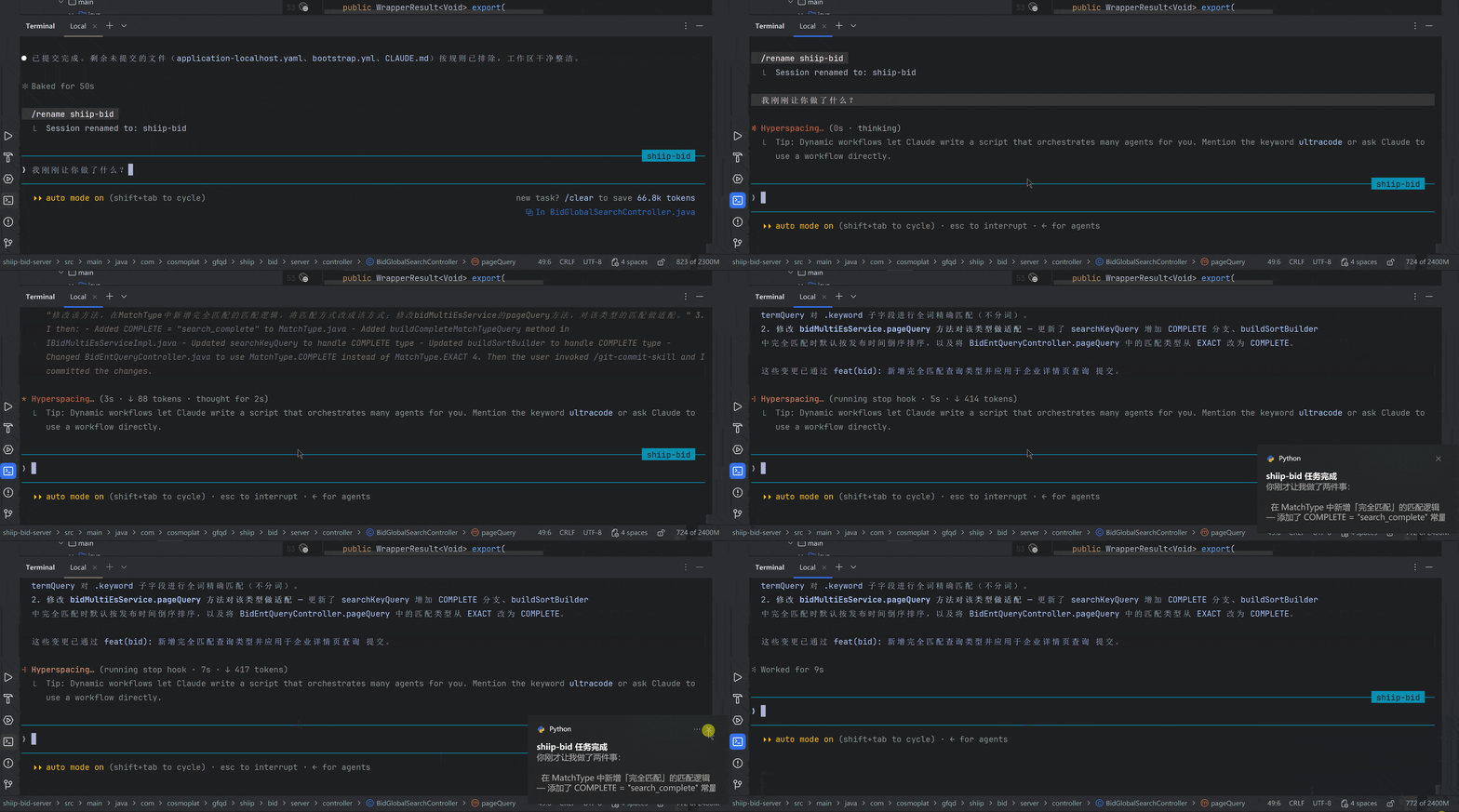
第一步:安装python依赖
pip install win10toast
第二步:准备python脚本
将下面的Python脚本放到硬盘上的某个目录,不要移动
# send_notification_advanced.py
import sys
import json
import os
import re
def format_duration(seconds):
"""将秒数格式化为人类可读的耗时"""
if seconds is None:
return ""
seconds = int(seconds)
if seconds < 60:
return f"{seconds}秒"
elif seconds < 3600:
return f"{seconds // 60}分{seconds % 60}秒"
else:
return f"{seconds // 3600}时{seconds % 3600 // 60}分"
def extract_session_name(transcript_path):
"""从 JSONL transcript 中提取会话名称 customTitle > aiTitle > slug"""
try:
if not transcript_path or not os.path.exists(transcript_path):
return None
custom_title = None
ai_title = None
slug = None
with open(transcript_path, 'r', encoding='utf-8-sig') as f:
for line in f:
line = line.strip()
if not line:
continue
try:
obj = json.loads(line)
except json.JSONDecodeError:
continue
t = obj.get('type', '')
if t == 'custom-title':
val = obj.get('customTitle', '')
if val and val.strip():
custom_title = val.strip()
elif t == 'ai-title':
val = obj.get('aiTitle', '')
if val and val.strip():
ai_title = val.strip()
s = obj.get('slug', '')
if s and s.strip():
slug = s.strip()
return custom_title or ai_title or slug
except Exception:
return None
def extract_human_summary(transcript_path):
"""从 JSONL transcript 中提取最后一条人类可读的 assistant/user 消息文本"""
try:
if not transcript_path or not os.path.exists(transcript_path):
return None
with open(transcript_path, 'r', encoding='utf-8-sig') as f:
lines = f.readlines()
for line in reversed(lines):
line = line.strip()
if not line:
continue
try:
obj = json.loads(line)
except json.JSONDecodeError:
continue
if obj.get('type') not in ('assistant', 'user'):
continue
msg = obj.get('message')
if not isinstance(msg, dict):
continue
content = msg.get('content', [])
if not isinstance(content, list):
continue
for block in content:
if not isinstance(block, dict):
continue
text = block.get('text', '')
if text and isinstance(text, str) and len(text.strip()) > 10:
clean = text.strip().replace('\r\n', '\n').replace('\r', '\n')
return clean
return None
except Exception:
return None
def render_markdown_to_plain(text):
"""将 Markdown 渲染为纯文本,去除格式符号保留内容"""
if not text:
return text
# 代码块 ```...``` 整体替换为首行摘要
text = re.sub(r'```[\s\S]*?```', '[代码块]', text)
# 行内代码 `code`
text = re.sub(r'`([^`]+)`', r'\1', text)
# 图片  → alt
text = re.sub(r'!\[([^\]]*)\]\([^)]+\)', r'\1', text)
# 链接 [text](url) → text
text = re.sub(r'\[([^\]]+)\]\([^)]+\)', r'\1', text)
# **加粗** → 加粗
text = re.sub(r'\*\*([^*]+)\*\*', r'\1', text)
# *斜体* → 斜体
text = re.sub(r'\*([^*]+)\*', r'\1', text)
# ~~删除线~~
text = re.sub(r'~~([^~]+)~~', r'\1', text)
# 标题行 ## Title → Title
text = re.sub(r'^#{1,6}\s+', '', text, flags=re.MULTILINE)
# 无序列表 - item → • item
text = re.sub(r'^(\s*)[-*+]\s+', r'\1• ', text, flags=re.MULTILINE)
# 有序列表 1. item → 保持
text = re.sub(r'^(\s*)\d+\.\s+', r'\1 ', text, flags=re.MULTILINE)
# 引用 > text → text
text = re.sub(r'^>\s?', '', text, flags=re.MULTILINE)
# 分割线 --- → ─────
text = re.sub(r'^[-*_]{3,}\s*$', '─────', text, flags=re.MULTILINE)
# 多余空行压缩
text = re.sub(r'\n{3,}', '\n\n', text)
return text.strip()
def show_notification(title, message):
"""使用 Windows 原生 Toast 通知"""
try:
from win10toast import ToastNotifier
toaster = ToastNotifier()
toaster.show_toast(title, message, duration=5, threaded=True)
import time
time.sleep(5)
except Exception as e:
print(f"[{title}] {message}", file=sys.stderr)
if __name__ == "__main__":
title = "Claude Code"
message = "任务已完成"
if not sys.stdin.isatty():
try:
raw_input = sys.stdin.read()
if raw_input and raw_input.strip():
data = json.loads(raw_input)
transcript_path = data.get('transcript_path')
session_name = extract_session_name(transcript_path)
if session_name:
title = f"{session_name} 任务完成"
else:
session_id = data.get('session_id')
if session_id:
title = f"Claude Code ({session_id[:8]})"
summary = extract_human_summary(transcript_path)
if summary:
message = render_markdown_to_plain(summary)
elif data.get('exit_code') is not None:
exit_code = data['exit_code']
if exit_code == 0:
message = "✅ 任务执行成功"
else:
message = f"❌ 任务执行失败 (exit={exit_code})"
duration_raw = data.get('duration_ms') or data.get('duration', '')
if duration_raw:
try:
sec = float(str(duration_raw).replace('ms', '')) / 1000
duration_text = format_duration(sec)
if summary:
message = f"⏱ {duration_text}\n{message}"
elif not data.get('exit_code'):
message = f"⏱ {duration_text}"
except (ValueError, TypeError):
pass
except json.JSONDecodeError:
if raw_input and raw_input.strip():
message = raw_input.strip()[:200]
except Exception:
pass
show_notification(title, message)
第三步:修改Claude Code配置文件
打开C:\Users\{用户名}\.claude目录,修改settings.json文件,新增或者修改hooks配置项:
  "hooks": {
	"Stop": [
      {
        "matcher": "",
        "hooks": [
          {
            "type": "command",
            "command": "python D:/plugin/hook/task_complete_notification/script.py"
          }
        ]
      }
    ]
  }
注意路径不需要使用反斜杠,使用反斜杠会报错。
注意:本文归作者所有,未经作者允许,不得转载